Logo stickers are one of those rare business investments that do three different jobs at once: they brand your packaging, delight your customers, and keep showing up in the world long after the original order has been delivered.
A customer who puts your sticker on their water bottle, laptop, or journal is advertising your brand every day. That kind of organic reach can’t be bought — but it can be designed for.
What Makes a Great Logo Sticker?
Not every logo translates well to sticker format. A great sticker logo has:
- Clear silhouette — readable at small sizes and from a distance
- Limited colors — 2–3 colors maximum. More than that and the sticker looks busy
- No fine details — hairline strokes and tiny text disappear when printed small
- Works on white AND transparent background — you’ll want both options
Sticker Shapes and When to Use Each
Circle Stickers
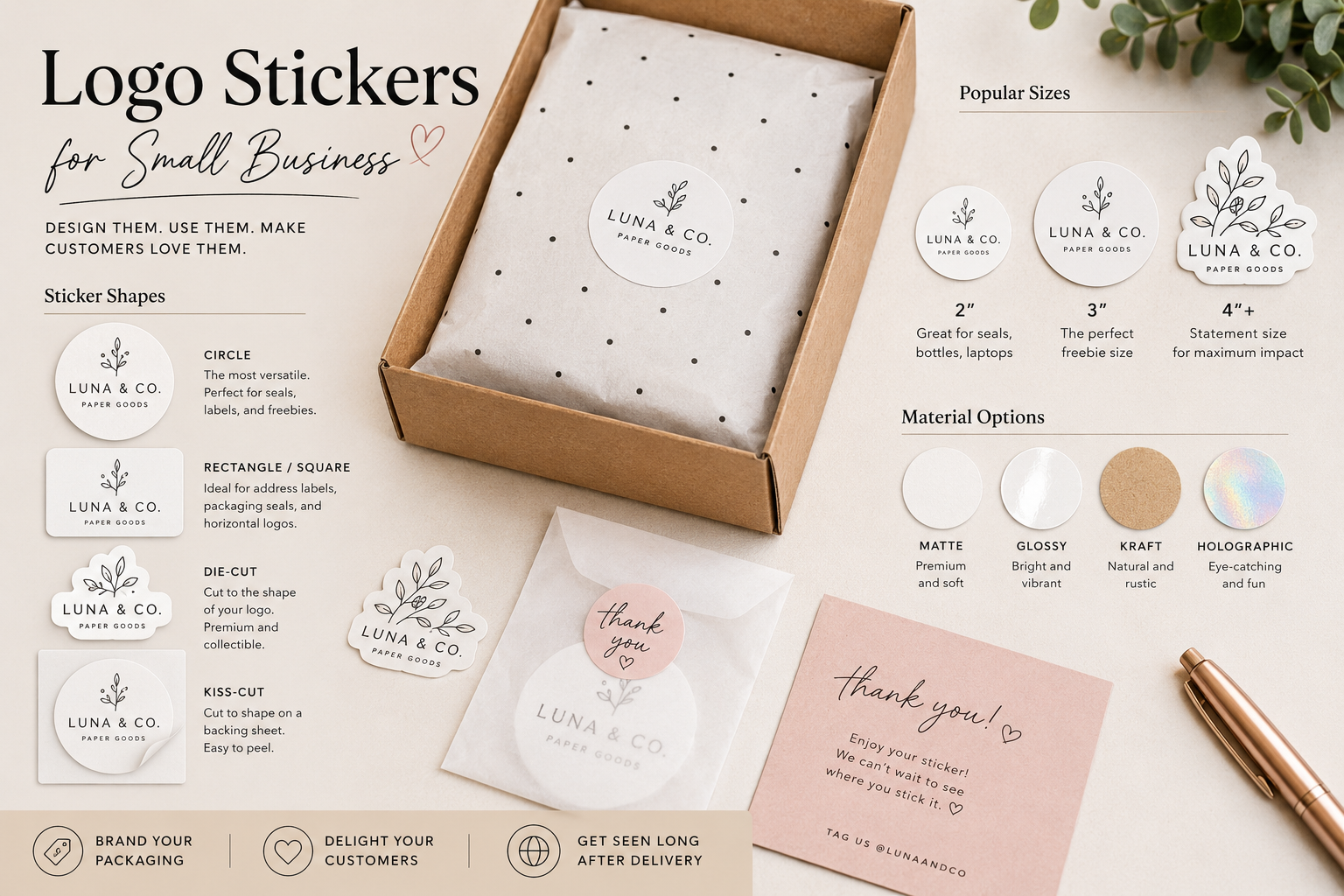
The most versatile shape. Works as a tissue paper seal, a product label, a freebie in orders, and a packaging sticker. If you’re only going to have one sticker shape, make it a circle.
Rectangle and Square Stickers
Better for logos with horizontal or square compositions. Useful for address labels and packaging seals on flat envelopes.
Die-Cut Stickers
Cut to the exact shape of your logo or design. The most premium-looking option. Customers treat these like collectibles and are far more likely to keep and use them. Worth the extra cost if your budget allows.
Kiss-Cut Stickers
Cut to shape but left on a backing sheet with a border. Easier to peel, slightly cheaper than die-cut. Great for multi-sticker sheets.
Sizes: What Actually Gets Used
Think about where your customers will actually put a sticker. The most popular sizes:
- 2″ circle — perfect for packaging seals, water bottles, laptops
- 3″ circle or die-cut — the sweet spot for freebies. Big enough to be noticed, small enough to go anywhere
- 4″+ die-cut — statement stickers for laptops and journals. Higher cost but more perceived value
Material: Matte, Glossy, or Holographic?
- Matte vinyl — premium look, pairs well with most brand aesthetics. Slightly less vivid colors
- Glossy vinyl — brighter colors, catches light. Better for high-contrast designs
- Kraft paper — rustic, natural feel. Only use if your logo works in limited ink on brown
- Holographic/glitter — eye-catching but niche. Works for youth brands, stationery, and novelty products
All sticker materials for product use should be waterproof vinyl. Paper stickers peel, bubble, and look terrible within weeks.
Using Stickers as Packaging Inserts
Including a free sticker in every order is one of the most effective ways to increase customer loyalty and repeat purchases. Cost per unit is typically $0.10–0.30 for bulk die-cut stickers. The perceived value to the customer is far higher.
Package the freebie sticker in a small glassine bag or protect it between two pieces of card so it arrives flat and pristine. A bent or scratched sticker does more harm than no sticker at all.
FAQ
How many stickers should I include per order?
One is the standard. Two feels generous. Three or more starts to feel like you’re trying too hard. One well-designed, die-cut sticker in a glassine envelope is the perfect execution.
Should I sell stickers separately?
Yes, if your brand has visual appeal and a fanbase. Sticker listings are low-cost to produce and ship, have good margin, and attract customers who might not otherwise buy your main product range.
What DPI should my sticker artwork be at?
300 DPI minimum for any commercial print sticker order. For large format (4″+), 300 DPI at final print size. For digital cutters (Cricut, Silhouette), PNG at 300 DPI with a transparent background.